Create useful shortcuts on your smartphone for frequently used tasks.
Adverts
Learn to Create useful shortcuts on your smartphone. This represents an indispensable strategy for those seeking to optimize their time and increase daily productivity on electronic devices.
This practice mitigates repetitive screen touches, transforming long sequences of operational commands into a single automated click.
The maturation of mobile operating systems allows for the integration of applications, voice assistants, and smart widgets in a way that was previously considered too complex for average users.
Setting up personalized routines reduces digital fatigue, allowing you to focus your attention on tasks that truly require human discernment.
Adverts
To guide you in building a mobile interface perfectly optimized for your workflow, we've structured this straightforward technical manual.
What are these mobile automation features and how do they work?
Modern customization features act as logical bridges between the APIs of installed applications and the main interface displayed on the device screen.
The decision to Create useful shortcuts on your smartphone. It relies on the use of specific triggers that set off a chain of automatic actions.
A trigger can be a voice command, an exact geographic location, or simply the physical touch of a customized icon on the screen.
The operating system interprets this instruction and executes consecutive tasks, such as opening the GPS, playing a playlist, and sending a mock message.
This architecture eliminates the need to open multiple menus to perform an action that you repeat every day at the same time.
Smartphones are no longer static repositories of applications, but have begun to function as proactive assistants highly attuned to your routine.
How do I set up smart shortcuts on Android and iOS systems?
The implementation of these automations varies according to the development guidelines of each technological ecosystem, although both offer excellent native productivity tools.
Users of the Google system have strong integration with the virtual assistant ecosystem and interactive dynamic widgets on the home screen.
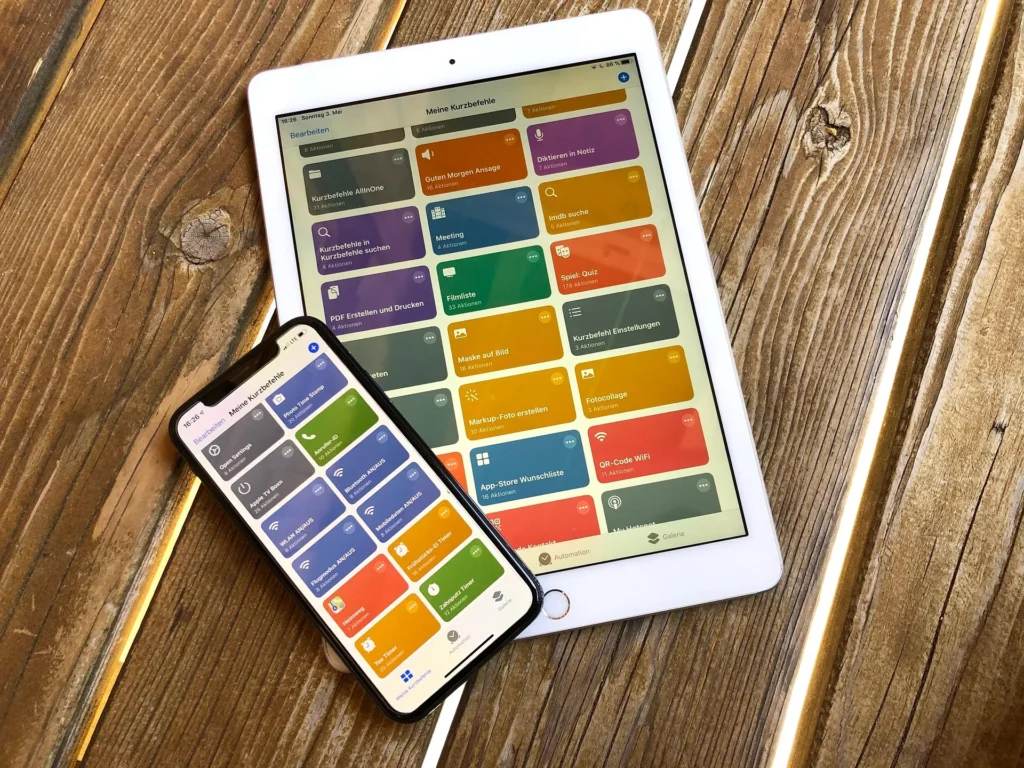
In the Apple ecosystem, the native Shortcuts app allows you to create complex visual scripts that interact deeply with internal hardware sensors.
You can configure the device to enter power saving mode and open your e-book as soon as the battery level reaches thirty percent.
For detailed documentation on accessibility development and automation features on mobile devices, please visit the official support page. Google Android. Understanding the ecosystem helps to explore the potential of the hardware.
Which daily tasks would generate the greatest time savings if automated?
Identifying which processes deserve a quick access icon requires an honest analysis of the digital actions you repeat mechanically.
The table below summarizes routine commands that, when unified under a smart command, save valuable minutes throughout a work week.
By choosing Create useful shortcuts on your smartphone., This way, you replace the stress of navigating submenus with a clean and predictable workflow.
Consider the technical integration possibilities that modern smartphones support without requiring invasive system modifications:
| Task Category | Trigger Used | Actions Executed in a Chain | Immediate Practical Benefit |
| Urban Commuting | Connect to your car's Bluetooth. | Open map app + Play favorite playlist | Immediate readiness for traffic |
| Focus on Work | Business hours (9am to 6pm) | Silence notifications + Enable auto-reply | Elimination of external distractions |
| Exercise Routine | Nearby location (GPS) | Open workout sheet + Record heart rate | Agile biometric monitoring |
| Home Security | Exiting the residential radius (Geofence) | Turn off smart lights + Activate cameras | Energy efficiency and protection |
Why does simplifying your home screen improve your mental health?
The visual organization of your mobile device directly influences cortisol levels and the propensity for involuntary procrastination throughout the day.
Screens filled with colorful icons and red labels indicating pending notifications generate excessive visual stimuli that fragment the human capacity for concentration.
Replacing chaotic blocks of applications with consolidated routines drastically reduces the unconscious screen time spent searching for basic utilities.
Read more: Apps and websites for freelancers and students in Brazil that help automate tasks.
You begin to use the device intentionally, accessing the right tool at the exact moment when the work actually requires it.
This minimalist approach transforms your cell phone into a strategic ally for your productivity, shielding your mind from the distracting triggers of social media.
The focus shifts to clean execution, where technology serves the user, reversing the logic of digital dependency.
How can I ensure data security when using third-party shortcuts?
Although the global tech community shares extremely creative routines online, caution should guide the downloading of scripts created by unknown individuals.
It is essential to review each command line before granting sensitive data read permissions or location access.
Giving absolute priority to automations built by you ensures total control over what information is being handled behind the scenes of the device.
Know more: Autonomous agent technology and tasks without human intervention.
Avoid scripts that ask you to automatically fill in bank passwords or two-step verification codes from messaging apps.
To stay up-to-date on digital security and data protection in mobile environments, follow the technical analyses of [Company Name]. Apple Support.
Developing a critical stance towards app permissions protects your identity and preserves the integrity of your device.
The verdict for an efficient and productive mobile routine.
Customizing your interactions with your mobile phone goes far beyond mere aesthetics, representing a real investment in your digital quality of life.
Read more: Interesting facts about home robotics and smart tasks.
Automating tedious processes frees up mental space so you can focus your energies on what truly adds value to your career.
Experiment with your operating system's native tools, test different trigger combinations, and adjust the commands as your routine evolves.
Technology should act as an extension of your efficiency, simplifying daily life through the power of intelligent automation.
Frequently Asked Questions (FAQ)
Creating custom shortcuts can increase your phone's battery consumption?
Only use this method if the trigger utilizes continuous GPS location tracking; prefer triggers based on fixed schedules or Wi-Fi network connections.
Is it possible to sync the same shortcuts between a smartphone and a tablet?
Yes, as long as both devices use the same operating system and are linked to the same cloud account with synchronization enabled.
How do I delete an automation that no longer makes sense to me?
Simply open the system's native automation app, press and hold your finger on the desired flow, and select the permanent delete option.
Do I need programming knowledge to create these fast flows?
No, current native tools use interactive visual blocks in a drag-and-drop style, allowing anyone to easily configure sequences of actions.