Set up Do Not Disturb mode to avoid daily interruptions.
Adverts
Learn to Set up Do Not Disturb mode. This represents the first step towards regaining control of your attention, eliminating unnecessary alerts and optimizing your time during workdays.
The constant barrage of sound notifications, app banners, and intermittent vibrations fragments concentration, increasing stress levels and reducing efficiency in complex tasks.
Modern operating systems offer granular customization tools, allowing you to silence alerts without missing urgent messages from priority contacts or family emergencies during the workday.
We'll explore how to adjust settings on Android and iOS, schedule automatic appointments, manage call exceptions, and create personalized routines to maximize your focus and rest.
Adverts
What is Do Not Disturb mode and how does it work on mobile systems?
This is a native feature found in smartphones that silences calls, app alerts, and visual notifications without disconnecting the mobile device's network connection.
Unlike airplane mode, which completely disables cellular and Wi-Fi signals, this feature maintains data reception while hiding intermittent on-screen notifications.
The user can set specific rules to allow contacts marked as favorites or repeated calls within a short interval to bypass the silence barrier.
To know Set up Do Not Disturb mode. Properly preventing your focus from being interrupted by promotional messages or secondary social media updates during times of greatest demand is crucial.
How to adjust settings on Android and iOS step by step?
On Android, access the settings menu, select the sound and notifications option, and enter the tab dedicated to scheduled silencing of your device.
Customize which people can call, which apps are allowed to send priority alerts, and whether visual banners should appear when the screen is locked.
On iOS, use the control center or the Focus menu to create distinct profiles, such as work, personal time, reading, or restorative deep sleep.
Specify which home screens should display specific icons, ensuring a clean visual environment that avoids distractions during necessary mobile phone use.
Comparison of Features and Customization Across Platforms
| Mute feature | Access and Configuration on Android | Access and Configuration on iOS | Practical Benefit in Daily Life |
| Scheduling by Time | Daily programming in Sound > Do Not Disturb | Integration into the Focus and Schedules menu | Automatic activation without manual intervention. |
| Call Exception | Allow favorite contacts and repeated calls. | Allow favorite contacts and urgent calls. | Guaranteed contact for real emergencies. |
| Device Synchronization | Connectivity with Wear OS smartwatches | Syncing via iCloud with Mac and iPad | Unified silence throughout the ecosystem. |
| Hiding Banners | Blocking visual pop-ups and LEDs | Hiding on the lock screen and center | Complete elimination of visual distractions. |
Why does scheduling automatic appointments improve discipline and rest?
Scheduling automatic activation at the same times every day conditions the mind to enter a state of productive flow without depending on daily decisions.
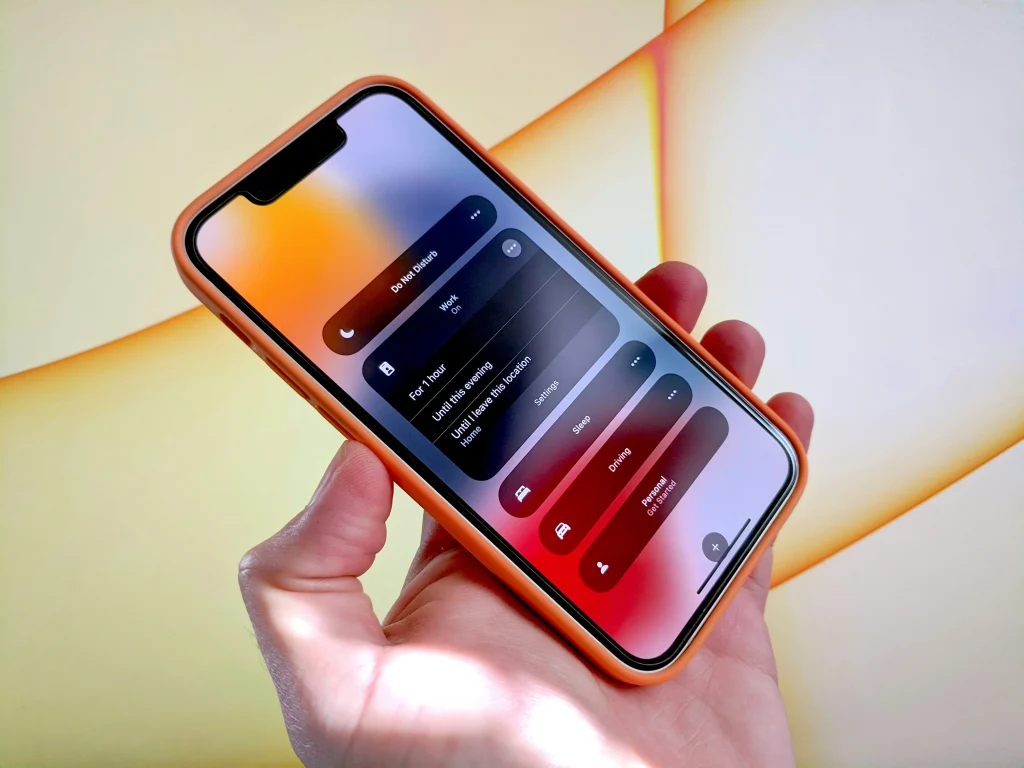
Setting a quiet timer an hour before bedtime reduces exposure to digital stress, preparing the brain for a restorative and deep sleep cycle.
Advanced systems allow you to link the silence profile to your geographic location, activating the restrictive mode as soon as you arrive at the office or gym.
Read more: Tips for reducing digital subscriptions you no longer use.
To understand accessibility guidelines, interface standards, and mobile software development, please refer to the official technical documentation of [the relevant authority/organization]. Android Developers.
What are the most common mistakes when setting up a silent phone?
Forgetting to add emergency contacts as favorites is a common mistake that can prevent family members from reaching you in sudden critical situations.
Another common mistake is not blocking visual alerts, allowing the screen to light up with each notification and continue to attract your attention involuntarily.
Failing to review the list of allowed applications every three months can lead to the accumulation of permissions for software that doesn't require immediate attention during daily routines.
Know more: Protect your home Wi-Fi network against unauthorized access.
Mastering how Set up Do Not Disturb mode. This requires adjusting these variables periodically, ensuring a healthy balance between accessibility, safety, and ongoing personal productivity.
How to integrate silencing with smartwatches and computers?

When you activate a focus profile on your smartphone, the settings should be automatically mirrored on your smartwatch, preventing your wrist from constantly vibrating during meetings.
Read more: If this message reached you, it wasn't by chance.
Synchronizing your system account on your work computer extends the silence to email and corporate messenger notifications while you produce analytical reports.
Corporate communication platforms allow you to align your presence status with your quiet profile, informing your teammates when you are in full concentration.
To consult digital security reports, best practices for technology use, and privacy in operating systems, access the portal of... Google Safety Center.
FAQ – Frequently Asked Questions
Will the cell phone alarm sound if the function is activated?
Yes, alarms set in the system's native clock continue to function normally, even when all other notifications and calls are completely silenced.
How can we ensure that emergency calls are answered?
Enable the repeated calls option in the settings, allowing a second call from the same number made within three minutes to ring the device.
Is it possible to mute only group messages and keep individual conversations open?
Yes, you can adjust permissions within specific messaging apps, muting group notifications while maintaining sound alerts for direct private conversations.
To know Set up Do Not Disturb mode. Strategically protect your mental health and boost your daily productivity levels. Adjust your device and enjoy an uninterrupted routine.